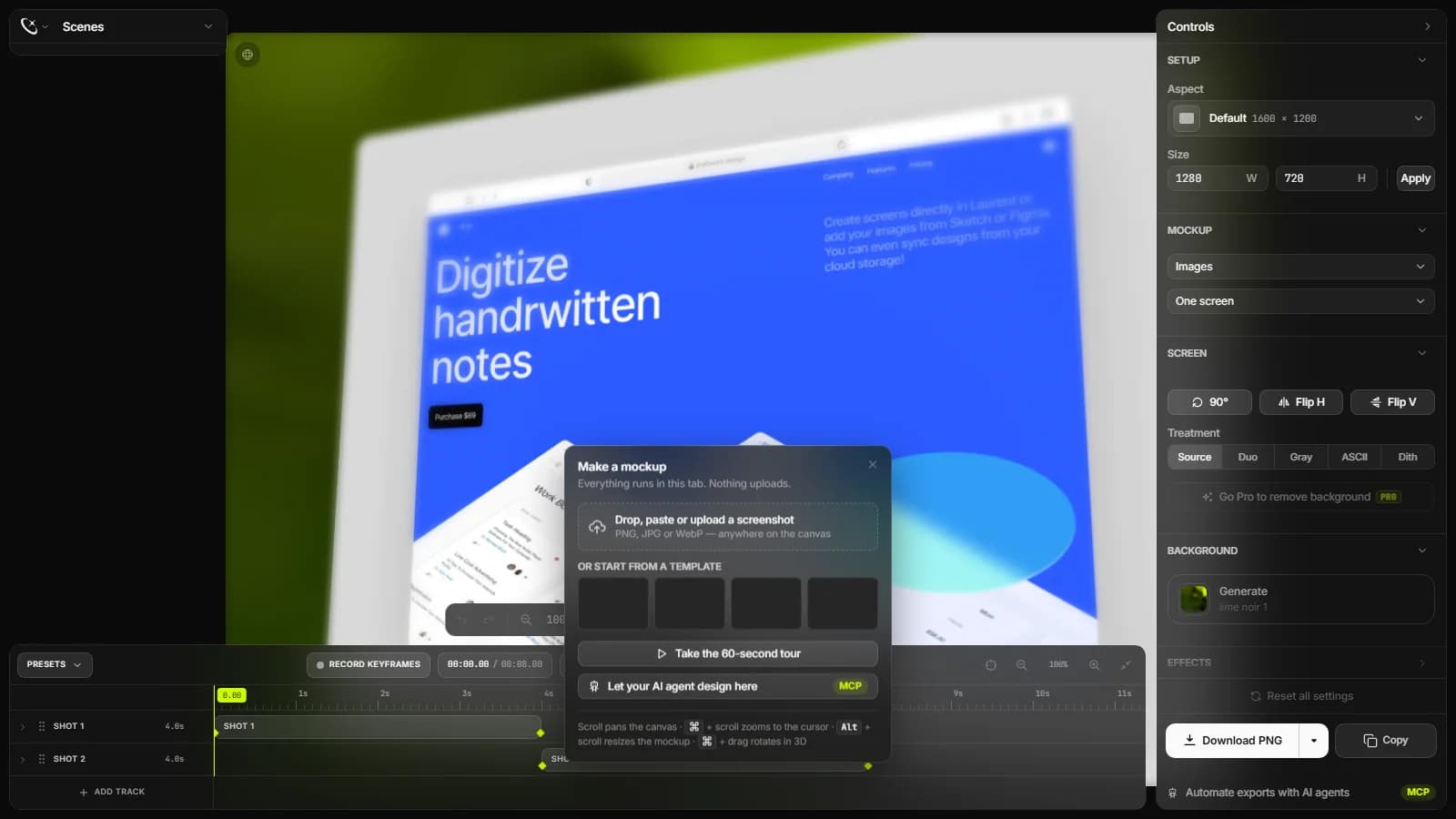
Shots.so is a lightweight browser studio that wraps static screenshots and screen captures into modern Apple hardware frames, generates parallax video zoom effects, and applies customizable backdrops. It accelerates the transition from engineering outputs to marketing collateral using client-side GPU acceleration.
Engineering Summary
Shots.so runs client-side SVG composition and a hardware-accelerated Canvas rendering engine without external video editing suites. Built on Next.js and Radix UI primitives, its interface delivers zero-latency previews and vector export support. It enriches screen recordings with smooth camera zooms, shrinking product launch prep time to minutes.
Production Context: Solving UI Presentation Bottlenecks
When software teams push a major release or interface update, building marketing visuals often introduces more friction than writing the feature code itself. Hunting for Figma plugins, calibrating drop shadows, or launching complex NLE suites just to keyframe a 10-second SaaS teaser consumes valuable engineering hours.
Shots.so removes this overhead by consolidating the workflow into a single browser tab. Developers and product managers can paste raw clipboard captures directly into modern iPhone, iPad, or MacBook chassis, adjusting perspective, depth, film noise, and 3D shadows via real-time sliders. This setup keeps documentation updates and social product showcases aligned with rapid release schedules.
Under the Hood: Architecture, Interaction, and Tech Stack
The frontend architecture uses Next.js with Radix UI headless components for accessible, stateful controls. Instead of triggering expensive DOM reflows on every slider adjustment, real-time styling changes are delegated to GPU layers via Tailwind CSS utility mapping and optimized SVG matrices.
The video processing pipeline breaks uploaded MP4 or WebM screen recordings into frames within browser memory. When highlighting specific UI components, the engine maps predefined easing curves to video layers. To preserve enterprise brand consistency across UI/UX design systems, accent palettes and border-radius values sync dynamically. Validating these client-side render routines with a reliable speed tester demonstrates how client-only processing cuts server compute expenses entirely. For static deck automation alternatives, explore our Presenta review to contrast slide-based workflows with dynamic video zooming.
| Evaluation Metric | Traditional Workflow | Shots.so Approach |
|---|---|---|
| Video Camera Zoom | Manual keyframing inside Premiere or After Effects | One-click parallax depth and focal point framing in-browser |
| Chassis Updates | Searching and downloading updated PSD/Figma device kits | Immediate availability of modern iPhone, Mac, and browser frames |
| Render Throughput | Heavy CPU/GPU local rendering queues | Instant in-browser MP4/GIF export via WebCodecs and Canvas APIs |
Production Decisions: When to Deploy, When to Avoid
Shots.so shines when producing changelog posts, X and LinkedIn product announcements, App Store assets, and developer docs. Vector SVG and 4K PNG exports meet high-resolution criteria required for corporate marketing landing pages.
However, it cannot replace full non-linear editors for multi-track audio mastering, complex 3D camera staging, or elaborate brand masking. The tool focuses strictly on rapid device framing and micro-video animations rather than comprehensive timeline editing.
Kling Digital Architecture Note
When embedding video exports into SaaS marketing landing pages, convert Shots.so MP4 files to modern WebM format and serve them via a CDN. This approach maintains high LCP performance scores while displaying crisp, hardware-accelerated product teasers.